


What is RIDA?
Make every day easier with smart automation. Save time, reduce stress and get results.

Phrase
Reusable phrases for faster communication.

Macro
Automate tasks with a single click.

Limitless
Any industy. Every program. Automate it all.

Safety
Security assessment: Excellent.

Plug & Play
No integration needed. Instantly usable.

For everyone
Easy to learn, simple to use.
01 RIDA IN 10 SECONDS
Great results start with smarter tools.
01
EFFICIENCY
Increases efficiency multiple times over.
02
TOP QUALITY
Standardizes the quality of care.
03
FOCUS
Less stress, more energy, better days.
02 BENEFITS
Here’s where RIDA saves the day.
RIDA is intelligent automation software that simplifies repetitive tasks, streamlines workflows, and helps teams across industries work smarter, save time, achieve more and focus on what truly matters.
Originally developed for medical professionals. It uses existing phrases, automatisation of repeated functions, and an intuitive visual UI solution to reduce documentation burden.
Optimize your work. Take action now!
03 SAVE TIME
Work smarter, not harder! Let RIDA take care of the paperwork.
-
1
Keystrokes saved
-
2
Minutes gained
-
3
Typos not made
Based on surveys, physicians using RIDA save on average 30–45 days per year on documentation – equivalent to over 250–350 hours. What about you?
04 ACTION BUTTONS
RIDA – Replicate, replay, relax
Phrase Function – Faster, Smarter Documentation
The Phrase function speeds up documentation and communication. Insert ready-made text snippets instantly—saving time and ensuring consistency across all tasks.
- Multilingual support: Save each phrase in Finnish, Swedish, and English under a single identifier.
- Simple access: Use hotkeys or pinned favorites for ultra-fast insertion.
- Seamless macro integration: Phrases can be combined with macros to create smooth, automated workflows—open an app, navigate to the right field, insert text, and continue without interruptions.
- Consistent results: Standardized wording improves accuracy and reduces errors.
Key takeaways: Supports three languages, Works everywhere, Boosts efficiency & saves time.
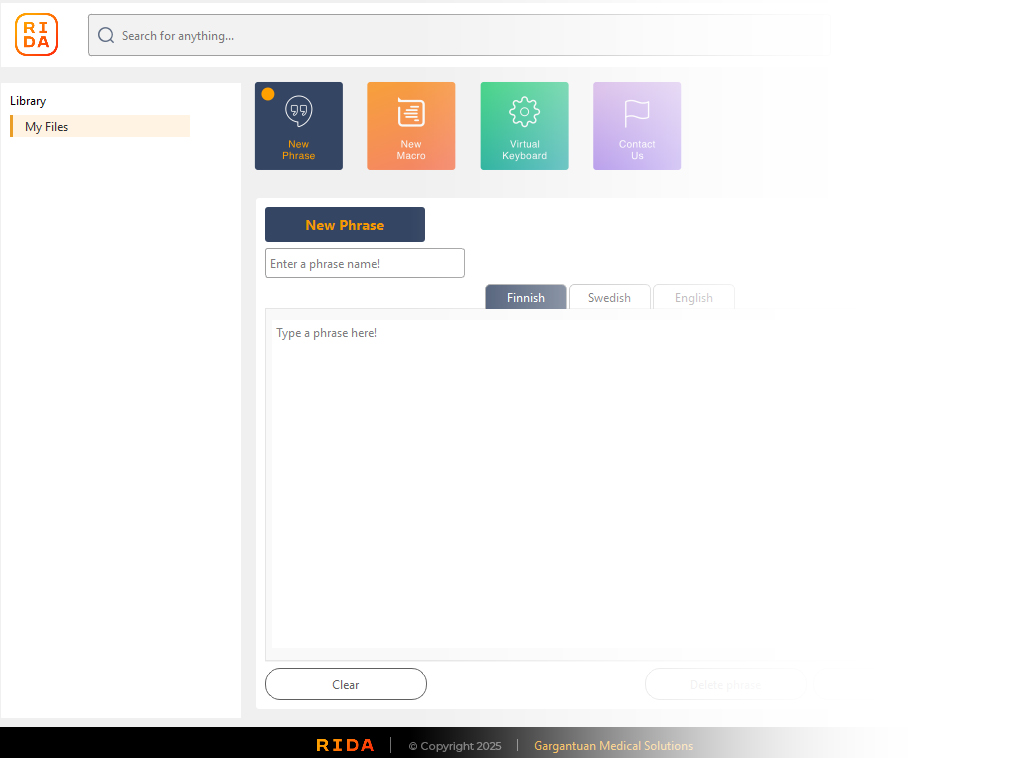
“With phrases, your team gains speed, accuracy, and flexibility, all in a tool that integrates directly into daily workflows.”
Macro Function – Automate Repetitive Tasks
The Macro function eliminates repetitive work. With just a shortcut, users can execute complex sequences instantly—saving time and reducing manual effort.
- Record once, use anytime: Capture keystroke sequences, navigation steps, and commands.
- Customizable workflows: Edit and fine-tune macros to fit specific tasks or applications.
- Phrase integration: Combine macros with saved phrases for seamless automation—type text, move through fields, and confirm actions in one smooth flow.
- Cross-application use: Works across all Windows programs, including EHR systems, office tools, and remote desktop environments.
Key takeaways: Saves time, Reduces errors, Works everywhere, Turns multi-step tasks into one click actions.
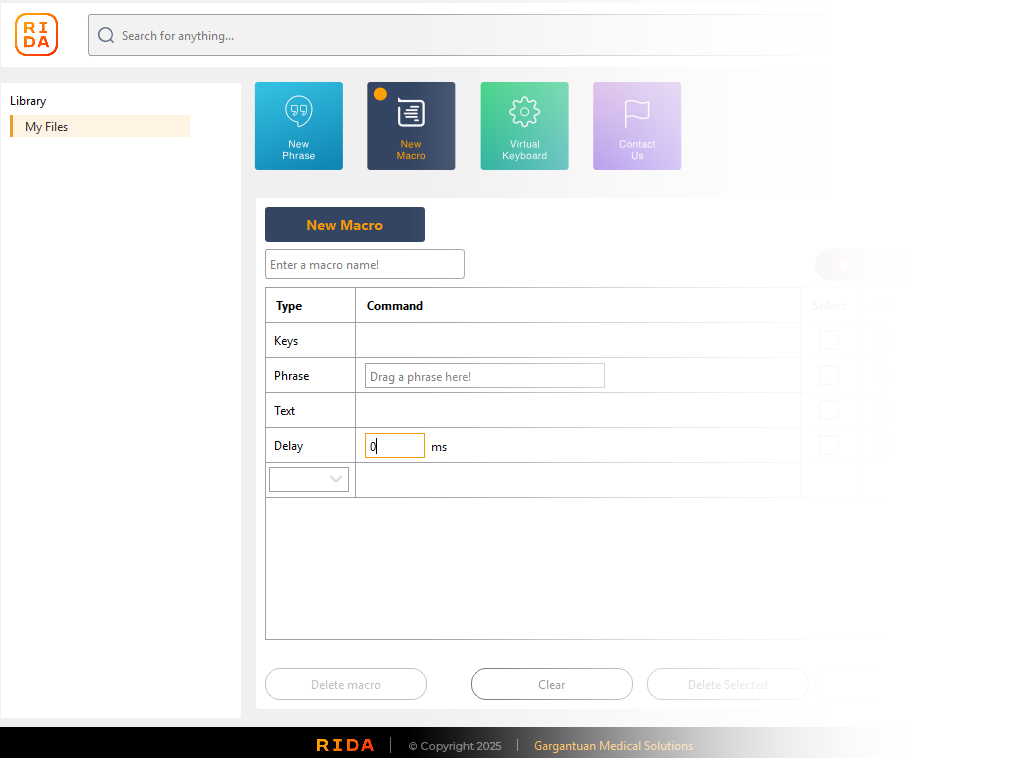
“With macros, your team can work faster, smarter, and more consistently, ensuring that routine processes no longer slow down productivity.”
Virtual Keymap Layout – Click, Don’t Remember
The Keymap Layout provides a visual interface for triggering actions. No memorizing shortcuts, simply click to execute a predefined sequence of actions instantly.
- Visual and intuitive: A clear, on-screen layout makes commands easy to find and use—no need to memorize hotkeys.
- Unlimited customization: Build endless keymaps for specific workflows such as prescriptions, communication, forms, billing, or any task where repetition slows you down.
- Seamless integration: Each key can represent a phrase, a macro, or a complex workflow combining both, allowing full automation with a single click and flexibility.
- Organized by tabs: Create dedicated tabs for different contexts or roles, ensuring quick access to exactly the tools you need.
Key takeaways: Easy to use, Visual by design, Endless customization, One-click automation.
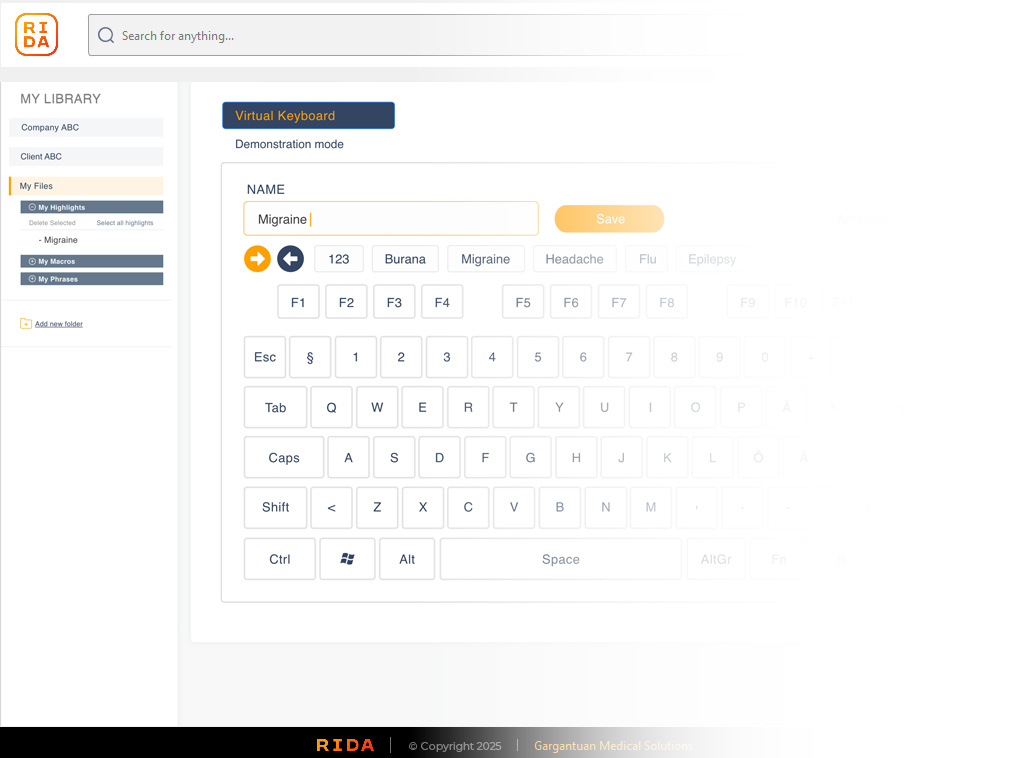
“With the Keymap Layout, your team gains clarity, speed, and full control, turning even the most complex tasks into simple, visual actions.”
Spend less time typing and get more done:
05 TAKE ACTION
From minutes to seconds – see the difference with RIDA
5 x prescriptions by hand
Manual workflow: 3 min 25 sec.
5 x prescriptions with RIDA
With RIDA automation: 25 sec.
06 TESTIMONIALS
Real stories, real results
07 FAQ
Everything you need to know about RIDA
Private Consumers
What is RIDA?
RIDA is a desktop automation tool that speeds up documentation and routine computer tasks by using phrases, macros, and a visual keyboard layout. It works in any Windows program without integrations.
Do I need to be good with computers to use RIDA?
Not at all. RIDA is designed to be intuitive and visual. Even users with minimal technical skills can learn it quickly.
Does RIDA work on my home or remote desktop setup?
Yes. RIDA works on local desktops, Citrix, and other remote environments without additional setup.
Is RIDA secure?
Yes. RIDA does not store or process patient data or personal content. It only automates keystrokes and text you provide.
In which languages can I save phrases?
Phrases can be saved in three different languages of your choice currently (hardcoded headings Finnish, Swedish, and English) under the same identifier, making multilingual use simple. More language options are coming.
Can I create my own shortcuts?
Yes. You can build your own macros, phrases, or keyboard layouts for any task you repeat often.
What are keymaps?
Keymaps are visual on-screen keyboards where each button triggers a phrase, macro, or workflow. They’re unlimited, so you can create dedicated layouts for prescriptions, forms, communication, or billing.
Do I need internet access to use RIDA?
RIDA works completely offline once installed and logged in, with all data stored locally in your My Documents folder. However, an internet connection is required during the initial installation and for user login/authentication.
How much time can I save?
Users typically report 3-7x efficiency gains. In many cases, the limiting factor becomes workload volume, not the software performance limit.
Will RIDA replace me?
No. RIDA is a productivity assistant, not a replacement. It helps you spend less time on administration and more time on actual work.
What happens if I make a mistake with a macro?
Macros can always be paused, edited, or deleted safely. You remain in full control.
Corporations
How is RIDA implemented in an organization?
RIDA is a desktop application that installs on individual workstations or remote desktops. It requires no integrations with existing IT systems.
What kind of ROI can we expect?
Organizations typically see capacity gains of up to 2–5x in documentation-heavy tasks, with improved employee satisfaction and reduced overtime.
How is sensitive data handled?
RIDA does not store or transmit patient or client data. It automates keystrokes only, making it GDPR-compliant and low-risk.
Can we control phrase and macro libraries centrally?
Yes. Teams can maintain shared libraries of phrases and macros, or allow individuals to create their own. Admin governance is possible.
What about multilingual environments?
Phrases can be saved in Finnish, Swedish, and English under one identifier, ensuring standardized communication across diverse teams.
How customizable is RIDA?
Highly customizable. Organizations can create endless keymaps by department or role (e.g., prescriptions, intake, billing, HR).
Is training required?
Minimal. Most users are comfortable after a short introduction session. RIDA’s visual keyboard layout reduces the need to memorize commands.
What platforms does RIDA support?
RIDA supports Windows 10 and later, and works on both local and remote (Citrix/RDP) environments.
How do we handle updates?
Updates can be rolled out centrally or per-user, depending on organizational policy. RIDA is lightweight and requires little IT overhead.
Is the technology protected?
Yes. The visual keyboard layout technology is patent-pending, ensuring unique value and protected innovation.
Can we test RIDA before committing?
Yes. RIDA offers a free pilot (typically 1–2 months, 1–10 users) to validate the benefits in your environment.
What benefits beyond efficiency can we expect?
Higher employee satisfaction (less mental fatigue), more patient/customer-facing time, consistent documentation quality, and reduced overtime.
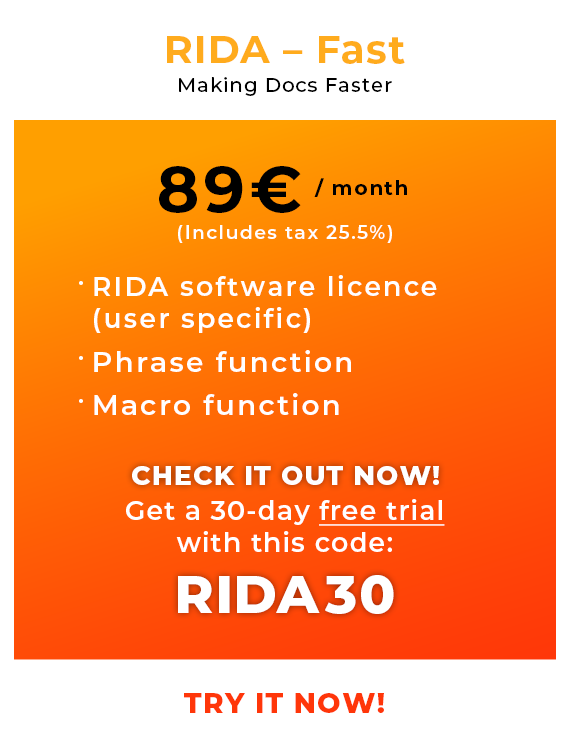
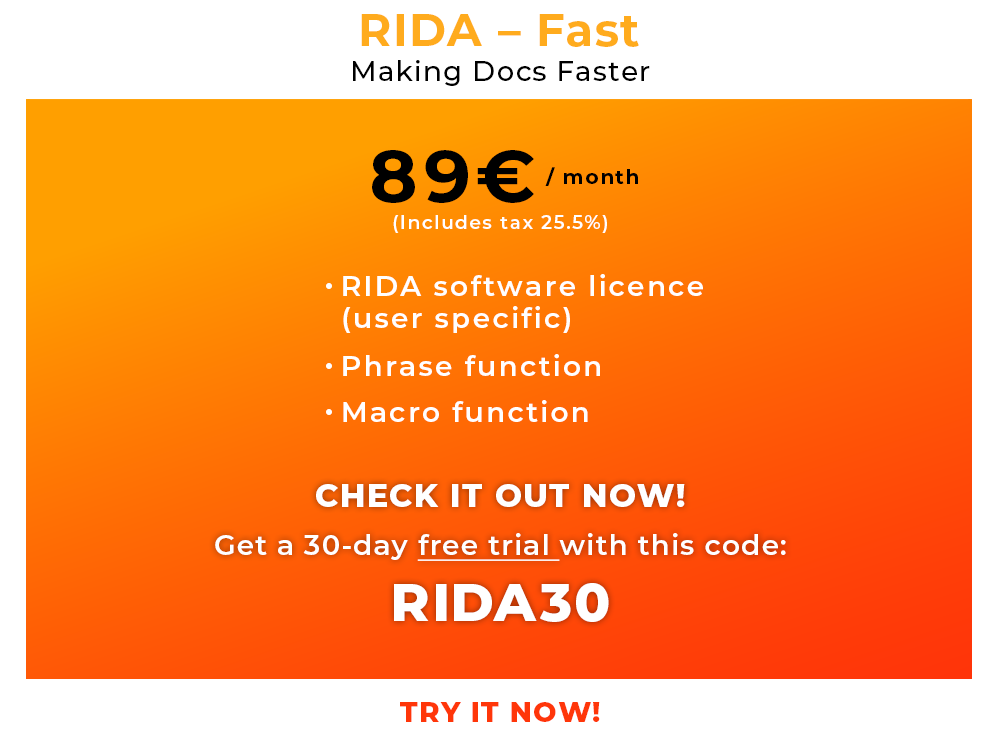
08 PRICES
09 PARTNERS
Our partners:


